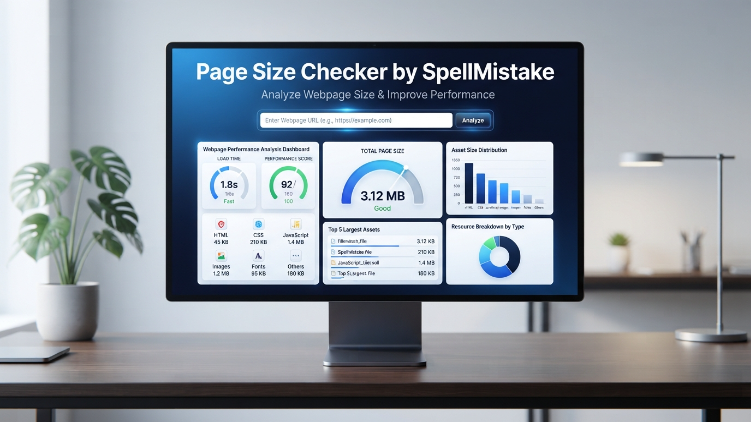

A webpage can look simple on the screen while carrying several megabytes of HTML, stylesheets, JavaScript, images, fonts, and other resources behind the scenes. The page size checker by SpellMistake provides a straightforward way to measure that digital weight and identify resources that may be slowing a page down.
Page weight matters because every byte must be transferred, processed, or rendered before users can fully interact with a site. A large page can be especially challenging on mobile connections, older devices, or networks with limited bandwidth.
| Key Metric | What It Shows |
|---|---|
| Total page size | Overall weight of the webpage |
| HTML | Size of the document structure |
| CSS | Stylesheet resources |
| JavaScript | Scripts loaded by the page |
| Images and media | Weight of visual content |
| Measurement units | Bytes, KB, and MB |
| Main purpose | Performance analysis |
| Suggested target | Keep page weight below 3 MB |
What Is the Page Size Checker by SpellMistake?
The page size checker by SpellMistake is a browser-based utility designed to measure the total size of a webpage. Instead of manually inspecting individual resources, a user can provide a webpage URL and receive information about its overall digital weight.
A page’s size is not determined by its visible text alone. Modern websites can load many different resources, including:
- HTML documents
- CSS files
- JavaScript bundles
- Images
- Video files
- Web fonts
- Embedded content
- Other supporting assets
The combined size of these resources contributes to the page’s overall weight.
Why Page Weight Matters
A lightweight page generally requires less data to transfer and process. This can help create a faster and more responsive experience, particularly for visitors using mobile networks or devices with limited processing power.
Heavy pages may take longer to become usable. Large images, unnecessary scripts, oversized stylesheets, and media files are common contributors to excessive page weight.
How the Tool Measures Webpage Size
The basic process is designed to be simple. Users enter the URL of a webpage and start the analysis. The resulting information can then be used to understand where the page’s weight is coming from.
Total File Size
The total file-size measurement provides an overall view of the webpage’s digital weight. Results can be represented in bytes, kilobytes, or megabytes, making them easier to interpret.
This number is useful as a starting point because it gives developers a quick indication of whether a page is relatively lightweight or carrying a substantial resource load.
Asset Breakdown
Looking only at total size does not explain why a page is heavy. An asset breakdown provides more useful context by separating major resource categories.
HTML, CSS, and JavaScript can each contribute to the final page weight. Comparing these categories helps identify which parts deserve closer investigation.
Media Weight
Images and videos can account for a significant portion of a webpage’s total size. High-resolution images that are larger than their displayed dimensions are particularly common sources of unnecessary weight.
Compressing media, selecting suitable formats, and serving appropriately sized assets can reduce this burden without necessarily sacrificing visual quality.
How to Use the Page Size Checker by SpellMistake
Using the utility involves only a few basic steps.
Step 1: Open the Checker
Navigate to the SpellMistake Page Size Checker and locate its URL input field.
Step 2: Enter a Webpage URL
Paste the complete address of the webpage you want to examine into the available field.
Step 3: Start the Analysis
Select the “Check Page Size” button to initiate the measurement.
Step 4: Examine the Results
Review the reported page size and available resource information. Pay particular attention to unusually large categories or individual assets.
The objective is not simply to obtain a number. The more useful goal is to understand which resources are responsible for that number.
What Makes a Webpage Too Heavy?
There is no universal page-size limit that applies perfectly to every website. A photography portfolio, interactive application, and text-focused article have very different resource requirements.
Even so, keeping overall page weight below approximately 3 MB can serve as a practical performance target for many ordinary webpages.
Common Sources of Excessive Page Weight
Several issues frequently increase page size:
- Uncompressed images
- Oversized image dimensions
- Large JavaScript libraries
- Duplicate scripts
- Unused CSS
- Multiple web fonts
- Auto-loading video
- Large third-party embeds
- Unoptimized background images
- Excessive animation assets
A page-size analysis can help determine which of these issues deserves attention first.
How to Reduce Webpage Size
Once a heavy resource has been identified, optimization becomes much more targeted.
Optimize Images
Images should be delivered at dimensions appropriate for their actual display area. Modern image formats can also provide substantial savings compared with unnecessarily large legacy files.
Image compression should balance file size and visual quality rather than simply applying the strongest possible compression.
Minify CSS and JavaScript
Minification removes unnecessary characters such as whitespace and comments from production code. Although the savings vary, reducing the size of frequently loaded resources can improve transfer efficiency.
Developers can also remove unused CSS and JavaScript where practical.
Reduce Unnecessary Scripts
Third-party scripts can add significant weight and processing requirements. Analytics, widgets, tracking systems, chat components, and embedded services should be reviewed regularly.
If a script does not provide meaningful value, removing it can improve both resource usage and page complexity.
Use Lazy Loading
Images and other non-critical resources do not always need to load immediately. Lazy loading can delay resources until they are needed, reducing the amount of work performed during the initial page load.
This is particularly useful for long pages containing many images.
Page Size and Mobile Performance
Page weight becomes especially important on mobile devices. A large desktop connection may conceal performance problems that become obvious on a slower mobile network.
Heavy pages can consume more data and require additional processing. Devices with limited hardware resources may also struggle with large JavaScript bundles or complex interactive interfaces.
For this reason, page-size analysis should be part of mobile performance testing rather than treated solely as a desktop optimization exercise.
Page Size and Search Performance
Page weight can influence the broader performance experience of a website. Search engines evaluate numerous signals related to usability and technical quality, while modern performance assessment also considers factors such as loading speed, responsiveness, and visual stability.
However, page size alone does not determine search visibility. A smaller webpage is not automatically better if it provides a poor user experience or removes essential functionality.
The stronger approach is to reduce unnecessary resources while preserving useful content and functionality.
What to Do After Finding a Large Page
A large result should trigger investigation rather than immediate deletion of resources.
Identify the Largest Contributors
Start by determining whether images, scripts, stylesheets, or other assets account for most of the weight.
Check Whether Each Resource Is Necessary
Ask whether every large asset contributes meaningful value. Unused resources create unnecessary transfer and processing costs.
Optimize Before Removing
Compression, resizing, minification, caching, and lazy loading may solve the problem without removing useful functionality.
Measure Again
After making changes, run another analysis and compare the results. Performance optimization works best as a continuous measurement-and-improvement process.
Final Takeaway
The page size checker by SpellMistake offers a simple way to understand how much digital data a webpage carries. Its value comes from turning an otherwise hidden technical issue into measurable information about total size and major resource categories.
Keeping pages reasonably lightweight can support faster loading, better mobile experiences, lower data consumption, and more efficient resource delivery. A practical target such as staying below 3 MB can provide useful guidance, but the right size ultimately depends on the purpose and functionality of the page.
The most effective workflow is straightforward: measure the page, identify heavy resources, optimize unnecessary weight, and measure again. That process can reveal performance problems that are difficult to spot from the visible webpage alone.
Frequently Asked Questions
What does the page size checker measure?
It measures the overall digital weight of a webpage and can provide information about major resource categories such as HTML, CSS, JavaScript, images, and other media.
Why is webpage size important?
A heavy webpage can require more data to download and more processing to render. This can contribute to slower loading and a less responsive experience, particularly on mobile connections and devices.
Is there an ideal webpage size?
There is no universal limit for every type of website. However, keeping an ordinary webpage below roughly 3 MB is a useful practical target when working to maintain efficient performance.
What usually makes a webpage large?
Large images, video, JavaScript, unused CSS, web fonts, third-party services, and oversized media assets are common contributors to excessive page weight.
Can reducing page size improve performance?
Yes. Reducing unnecessary resources can decrease the amount of data transferred and the work required by the browser, potentially improving loading and responsiveness.

Asad writes about the things that move the world forward — and the people brave enough to build them. Specializing in tech, business, news, and lifestyle content, he’s spent years turning complicated industries into compelling stories for magazines, digital platforms, and brand publications.
He believes great writing doesn’t just inform — it connects. That’s why editors keep coming back: he has a knack for making a SaaS deep-dive feel as gripping as a profile in GQ and a lifestyle feature read with the precision of The Economist.
He currently lives on strong Wi-Fi and stronger opinions about typography.